Key takeaways
- Outpatient therapy no-show rates typically run between 20% and 30%, compared with roughly 18% across general medical settings.
- Physicians and mental health providers spend a large share of their week on documentation and paperwork instead of client care.
- The fix is not more staff. It is consolidating scheduling, billing, and records into one system built for psychology practices.
- Practices that automate reminders and claims see measurably fewer missed sessions and faster payment cycles.
A psychology practice that started with a handful of clients and a paper calendar runs into a wall the moment it grows. Somewhere between eight and twenty active clients, the founder is no longer just a clinician. They are also the scheduler, the biller, the records clerk, and the person chasing a client who missed a session and never called back.


This is not a staffing problem. It is a systems problem, and it shows up in the numbers.
Missed appointments cost more in mental health than almost anywhere else in outpatient care. Outpatient therapy sees missed appointment rates typically between 20% and 30%, with psychiatry averaging near 23% and substance use treatment programs sometimes reaching 30% to 50%. That is more than double the average seen in primary care.
Every one of those gaps is an hour the clinician cannot bill and a client who did not get care they needed that week.
Documentation eats the other half of the problem. Research on outpatient consultations found that documentation alone accounted for about 35 percent of physician time, and that figure is consistent across studies looking at time spent on charting, notes, and records rather than direct care. For a psychologist running fifteen to twenty-five sessions a week, that is several hours of unpaid administrative work layered on top of every clinical hour.
[IMAGE: therapist reviewing paperwork and a laptop calendar at a desk]
None of this shows up on a spreadsheet as “admin cost.” It shows up as late nights finishing notes, as slower cash flow from claims sitting unsubmitted, and eventually as burnout that has nothing to do with the clinical work itself.
Where Independent Practices Feel It Most
Scheduling and No-Shows
A missed session is not just an empty slot. It is a canceled income stream for that hour, a client who may not reschedule, and often a scramble to fill the gap on short notice. Practices relying on manual reminders, a phone call here, a text there, see this compound weekly. The practices that automate two-way reminders see the gap close substantially, which points to reminders and scheduling friction, not client motivation, as the real driver behind a large share of no-shows.
Client Records and Compliance
Progress notes, intake forms, and treatment plans need to be secure, accessible, and compliant with data protection standards. A practice keeping records split across paper files, email attachments, and a shared drive is not just inefficient. It is a compliance risk every time a file moves between those places. One breach, one lost form, one improperly stored note, and the practice is exposed in a way no amount of clinical skill can fix.
Billing and Insurance Claims
Manual billing means entering the same client and session data multiple times: once in the calendar, once in the notes, once in the invoice, and again in the insurance claim. Each transfer is a chance for an error that delays payment. For a solo or small-group practice, that delay is not abstract. It is the gap between a predictable income and a cash flow problem that shows up every month.
What Changes When a Practice Adopts the Right System
The fix here is not hiring an office manager the moment revenue allows it. Most independent practices reach the same conclusion small businesses in other industries reach when manual processes stop scaling: consolidate the workflow into one system before adding headcount to manage a broken one.
A useful framework for what that system needs to do is three words: Centralize, Automate, Protect.
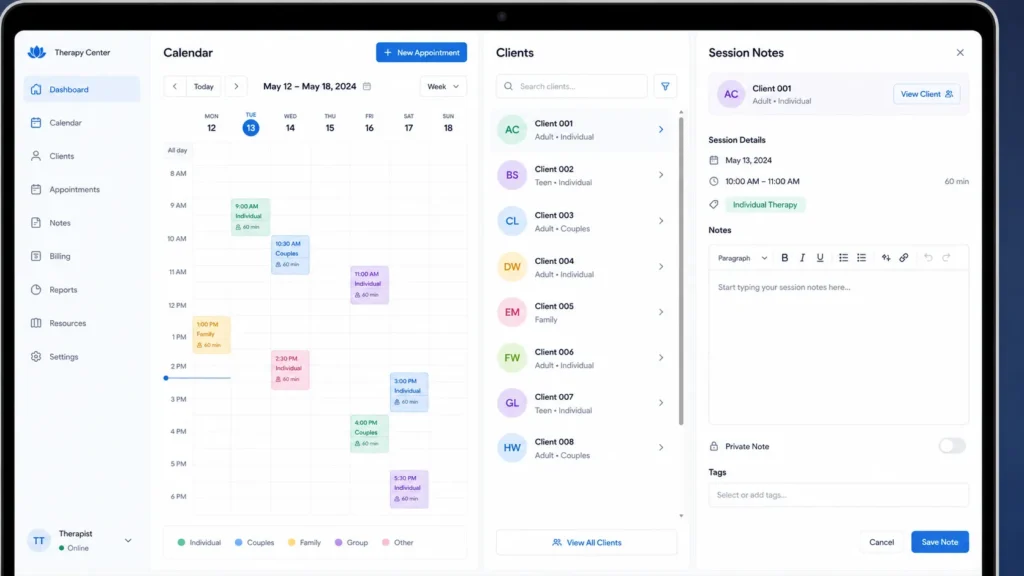
- Centralize scheduling, intake, and notes into one place instead of three.
- Automate the repetitive parts: reminders, rebooking, and claims submission.
- Protect client data with the compliance controls a spreadsheet cannot offer.
Each of these solves a different piece of the bottleneck, and together they change what a practice’s week actually looks like.
Centralize: One System for Scheduling and Records
The first fix is structural. When a client’s intake form, session history, notes, and calendar slot live in four different tools, someone has to manually keep them in sync. That someone is usually the clinician, working after hours.
Consolidating into a single system means a session is booked once and every downstream record, from the note template to the billing entry, updates from that single point. It also means a substitute clinician or a part-time associate can step in without hunting through someone else’s inbox for context.
Automate: Reducing No-Shows and Manual Billing
Reminders sent automatically by text or email, timed to the appointment rather than to whenever the clinician remembers to send them, directly address the no-show numbers above. This is where psychologist practice management software earns its keep: it is built specifically around the scheduling, note-taking, and billing cycle a psychology practice actually runs, rather than adapted from general medical software that assumes a different workflow.
Automated insurance claims submission removes the second half of the burden. Instead of re-entering session data into a claims portal, the system pulls what was already recorded at intake and at the session, submits it, and tracks the payment status without a second manual step.
The combined effect is fewer missed sessions and money that arrives faster, without adding a single hour to the clinician’s week.
Protect: Compliance Without the Guesswork
Data protection cannot be an afterthought in mental health, where the records themselves are among the most sensitive a client will ever hand over. A proper system builds in encrypted storage, access controls, and an audit trail showing who viewed or edited a record and when.
This matters for two reasons. First, it protects the client, which is the actual point. Second, it protects the practice: if a regulator or an insurer ever asks how records are secured, “we have a system that logs and encrypts everything” is a very different answer than “we keep most of it in a shared folder.”
Practices that treat this as a growth-stage decision rather than a startup one usually regret the delay. Retrofitting compliance into years of scattered records is far harder than building it in from the first client file.
The Real Numbers: Before and After
The difference between manual management and a consolidated system is easiest to see side by side.
| Task | Manual process | Consolidated system |
|---|---|---|
| Appointment reminders | Phone calls or memory-based texts | Automatic, timed messages sent per appointment |
| Session notes | Written separately, filed by hand | Logged directly against the client record |
| Insurance claims | Re-entered manually into a portal | Pulled from existing session data and submitted |
| Client records | Split across paper, email, and drives | Centralized, encrypted, and access-logged |
| New associate onboarding | Days spent explaining where everything lives | Immediate access to a single client view |
None of these rows is dramatic on its own. Together, they represent the difference between a practice that runs on the clinician’s memory and one that runs on a system.
What to Look for Before Switching Systems
Not every practice management platform is built for psychology practices specifically. Before switching, check for:
- Compliance certifications appropriate to the practice’s jurisdiction and client data requirements. A platform built for general retail or scheduling will rarely meet the same bar.
- Insurance billing integration, not just invoicing. Basic invoicing tools do not handle claims submission or payer-specific formatting.
- A client portal for intake, scheduling, and secure messaging, so clients are not emailing sensitive forms back and forth.
- Support for both solo and group practice structures, since a system built only for single-clinician use will not scale if the practice adds an associate.
- Migration support for moving existing client records without data loss, ideally with a dedicated onboarding process rather than a self-service export.
- Session note templates built around therapy documentation, not general medical charting, since the two follow different clinical and legal conventions.
A platform missing more than one or two of these will likely need a second tool bolted on within a year, which defeats the point of consolidating in the first place.
Making the Switch Without Disrupting Client Care
Switching systems mid-practice feels risky, and it should be handled carefully rather than avoided. A phased rollout works better than a hard cutover:
- Run the new system in parallel with the old process for two to four weeks, starting with new client intakes only
- Migrate existing client records in batches rather than all at once
- Train any additional staff on the new workflow before full migration, not after
- Set a firm cutoff date for the old system once the new one has handled a full billing cycle without issues
Clients rarely notice a well-run transition. They notice a missed reminder or a billing error, which is exactly what a good migration plan prevents.
Frequently Asked Questions
What is a psychologist’s practice management software?
It is software built specifically to handle scheduling, client records, session notes, and insurance billing for psychology and therapy practices, as opposed to general medical practice software adapted from other specialties.
How much time does admin work actually cost a psychology practice?
Documentation alone has been shown to account for roughly a third of a clinician’s working time in outpatient settings, separate from the time spent on scheduling, billing, and client communication.
Is switching practice management systems worth the disruption?
For most growing practices, yes. A phased migration over several weeks, run alongside the existing process, avoids disruption to client care while fixing the underlying bottleneck permanently.
Does automation actually reduce no-shows?
Yes. Practices using automated two-way reminder systems have reported no-show rates well below the industry average for their specialty, compared with manual reminder processes.
A growing psychology practice does not need more hours in the day. It needs fewer of those hours spent on work that a proper system can handle on its own.